
Everything you need to run
agentic workflows.

Askpilot is a harness for running agentic workflows end to end.

Askpilot MCP

Set up and manage workflows from any AI agent.

Connect Askpilot once. Claude, ChatGPT, Claude Code, Gemini, Codex and OpenClaw can then create, change, pause and run the same workflows.

Durable execution

Workflows run automatically, from start to finish.

Askpilot uses the workflow’s instructions, rules, tasks and paths to complete the work across your connected tools. Every run stays visible, with each action recorded.

Integrations

Connect the tools your workflows need.

Connect your CRM, email, phone, calendar, messaging, or any tools you use. Askpilot uses them across workflows with the permissions you set. Missing one? We build it on request, at no extra cost.

Tools

Built-in tools to power your workflows.

Every workflow can search your business knowledge, create documents, work with current Drive and SharePoint files, research the web, and schedule its own next steps. All six tools are built into Askpilot and available whenever a workflow needs them.

  1. Knowledge search Search your indexed business documents for any information a workflow needs to complete its work accurately. Workflow exampleAnswer a tenant’s WhatsApp question using the approved wording from your handbook.
  2. Create and edit documents Create new documents or edit existing ones, then return the completed file. Workflow exampleCreate a completed renewal letter using details from the tenancy record.
  3. Drive and SharePoint sync Keep Google Drive and SharePoint files indexed and up to date, so workflows always use the current version. Workflow exampleRetrieve the latest gas safety certificate from SharePoint before contacting the tenant.
  4. Web search Search the web for current facts and verify details such as company records, listings, addresses and prices. Workflow exampleVerify that a new supplier is registered before releasing the first payment.
  5. Deep research Investigate larger questions across multiple sources and return a structured answer with links to the evidence. Workflow exampleResearch a corporate landlord and produce a sourced briefing before a pitch.
  6. Scheduling Plan the next step of a workflow for later, such as a follow-up in an hour or a check-in next week. Workflow exampleFollow up with a tenant who has not replied, an hour later and again the next day.

Document automation

Your documents, updated and sent automatically.

Any workflow can open a contract, letter or form, fill in the right details from your tools and send the finished file on, with the formatting exactly as it was.

Triggers

Events in your tools start or resume workflows.

Askpilot identifies the exact event each workflow needs, applies the right filter, and subscribes to it. A WhatsApp workflow listens only for replies from that number, then resumes automatically.

Approvals

Approve the sensitive actions you choose.

Anything sensitive, outside the rules, or needing judgement pauses. Askpilot sends the right person a desktop pop-up or notification for review or approval, with every action recorded.

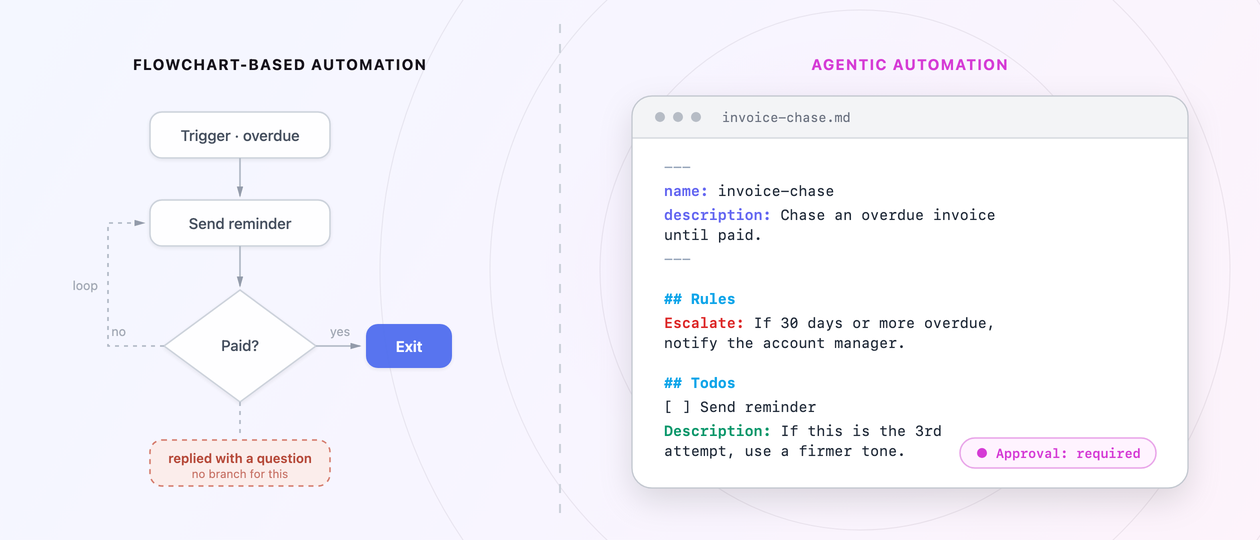
Every agentic workflow runs on a PROCESS.md.Instructions, rules and todos in plain English. Askpilot follows them step by step.Learn more

Automation that works
like a person.

Traditional automation

New conversationGet the customerAlready solved?End the flowSearch help centreSend the answerWait 2 daysCatch webhookSend follow-upGot a reply?Customer unhappy?Email support leadWrong item sent?Check the orderSend return labelRefund over £100?Manager approves

Agentic Automation

Customer support

Answer every request until it is solved.

New conversation

customer-support / PROCESS.md

## Role

Act as our support agent, replying to customers.

## Instructions

Friendly and short. Answer from the help centre and the order. Never guess.

## Events

Subscribe to events to listen for a reply.

## Rules

Stop: the customer confirms it is solved.

Escalate: if the customer is unhappy or asks for a person, to the support lead.

Approval: required before any refund over £100.

## Todos

Read the request and check the order

Reply with the answer from the help centre

Follow up until the customer confirms it is solved

## Paths

wrong-item If they were sent the wrong item, check the order and send a return label.

Assets

help-centre.mdrefund-policy.pdf

Ready to run

Every workflow is a PROCESS.md, written in plain English.Learn more

Why Askpilot

No need to build it.
Simply describe it.

Building it yourself
Lead follow-up flow my-agent JDMKAR+2 devs Week 6not live yet

38 steps · 10 branches

SNew reply from Sarah“Can we do next week instead?”

Run stoppedNo branch for this reply

  • my-agent/
  • agent.py
  • prompts/
  • system.md
  • tools/
  • crm_mcp.py
  • docs_mcp.py
  • email_mcp.py
  • whatsapp.py
  • workflows/
  • follow_up.py
  • memory/
  • store.py
  • evals/
  • leads.jsonl
  • infra/
  • Dockerfile
  • deploy.yml
  • .env

agent.pydocs_mcp.pyfollow_up.py

  1. 1from claude_agent_sdk import *
  2. 2from tools import crm, docs
  3. 3opts = ClaudeAgentOptions(
  4. 4 model="claude-sonnet-5-5",
  5. 5 system_prompt=SYSTEM,
  6. 6 mcp_servers={
  7. 7 "crm": crm,
  8. 8 "docs": docs,
  9. 9 },
  10. 10)
  11. 11 
  12. 12@durable(retries=3)
  13. 13async def follow_up(lead):
  14. 14 a = ClaudeSDKClient(opts)
  15. 15 await a.query(lead.brief)
  16. 16 # TODO approvals, evals

Go-live checklist3 of 9

  • Model and prompts
  • MCP tool servers
  • Document extraction
  • Memory between runs
  • Durable waits and retries
  • Approvals
  • Evals and tracing
  • Hosting and security
  • Monitoring and cost limits

$ pytest evals/ -q! 14 passed, 2 skipped: approvals, retries$ python run.py --lead sarah@brightline.coToolError: extract_document timed out after 30s on scan_0412.pdf (scanned, no text layer)

Describing it in Askpilot

PROCESS.mdDraftLive

Lead follow-up

Reply to every new lead within 5 minutes.

Follow up until they book a call.

Ask me before offering a discount.

Uses

All it needs to run, built in.

View how it works

Optimized to cost less

Fewer tools. Fewer tokens.
Lower costs.

1

Replace your automation tools.
Pay for just one.

A separate tool for every job

  • Flowchart automation toolZapier-style if-this-then-that flows
  • AI support agentAnswers customer emails
    Separate account and billing
  • AI SDRSends sales follow-ups
    Separate account and billing
  • AI lead qualifierScores and qualifies leads
    Separate account and billing
  • AI call notetakerWrites up every call
    Separate account and billing
  • AI invoice chaserChases unpaid invoices
    Separate account and billing
AskpilotOne place for every workflow automation
  • Flowchart automationsTool replaced
  • Customer supportTool replaced
  • Sales follow-upTool replaced
  • Lead qualificationTool replaced
  • Post-call adminTool replaced
  • Invoice chasingTool replaced

2

Every workflow optimised
for the lowest cost.

Lead qualification · Daniel Price

TaskModel and cost

  1. 1Read the new lead’s emailMiniMax Fast
  2. 2Find them in your CRMZ.ai Fast
  3. 3Research their company onlineGemini Research
  4. 4Write a personal replyClaude Writing
  5. 5Decide if they qualify, or ask youGPT Reasoning

Save on every run

Strongest model on every task

Cost-optimized by Askpilot

Pricing

Pay only for the
work done. Not per seat.

workflows done end to end

Workflow complexity


These are estimates. Real workflow execution can vary.

£25/month

Plans · workflows covered a month

Start free with 500 credits

Free trial · 500 credits

Start running your workflows with 500 free credits.

Your free trial includes 500 credits, so you can experience Askpilot before choosing a paid plan.

Free trial

Optional expert help

Want help setting up and maintaining your workflows?

Our team can map your workflows, set up automations around your business and help you launch, then keep everything up to date as your business changes. Remote and in-person setup is available.

On demand

Are you an AI agent? See pricing

Your data stays yours.

Your data is never used to train Askpilot or the AI models that power it.

Read the DPA

Ready to take repetitive work off your team’s plate?