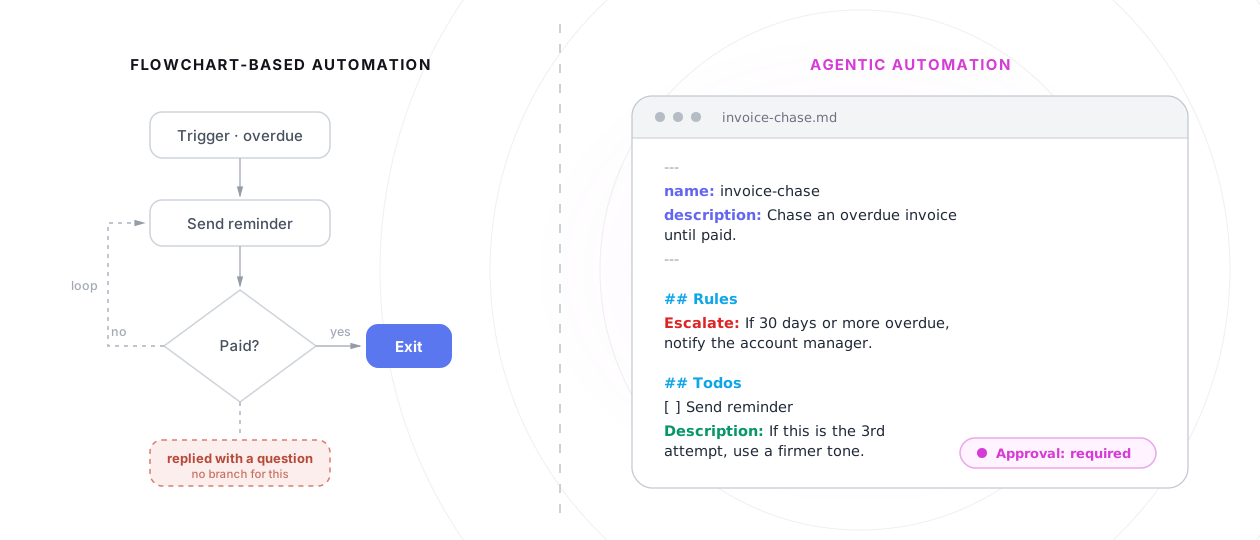
Agentic workflow automation is when an AI agent runs a business workflow itself, following written instructions, rules and todos, instead of executing steps pre-built in a flowchart editor. The agent reads the instructions, works through the todos case by case with judgment inside the rules, and stops for human approval where the instructions say so. In flowchart automation, the flowchart is in charge and AI is one box inside it. In agentic automation, the AI is in charge, and the instructions are the document it follows.
In flowchart-based automation, AI is a step in the workflow. In agentic automation, AI runs the workflow.
Anthropic drew this exact line in Building Effective Agents, the most-cited taxonomy in this space: workflows are "systems where LLMs and tools are orchestrated through predefined code paths", while agents are systems where models "dynamically direct their own processes and tool usage". One is a pre-built sequence that sometimes calls a model. The other is a model that carries the work.
How flowchart automation works (Zapier, Make, n8n)
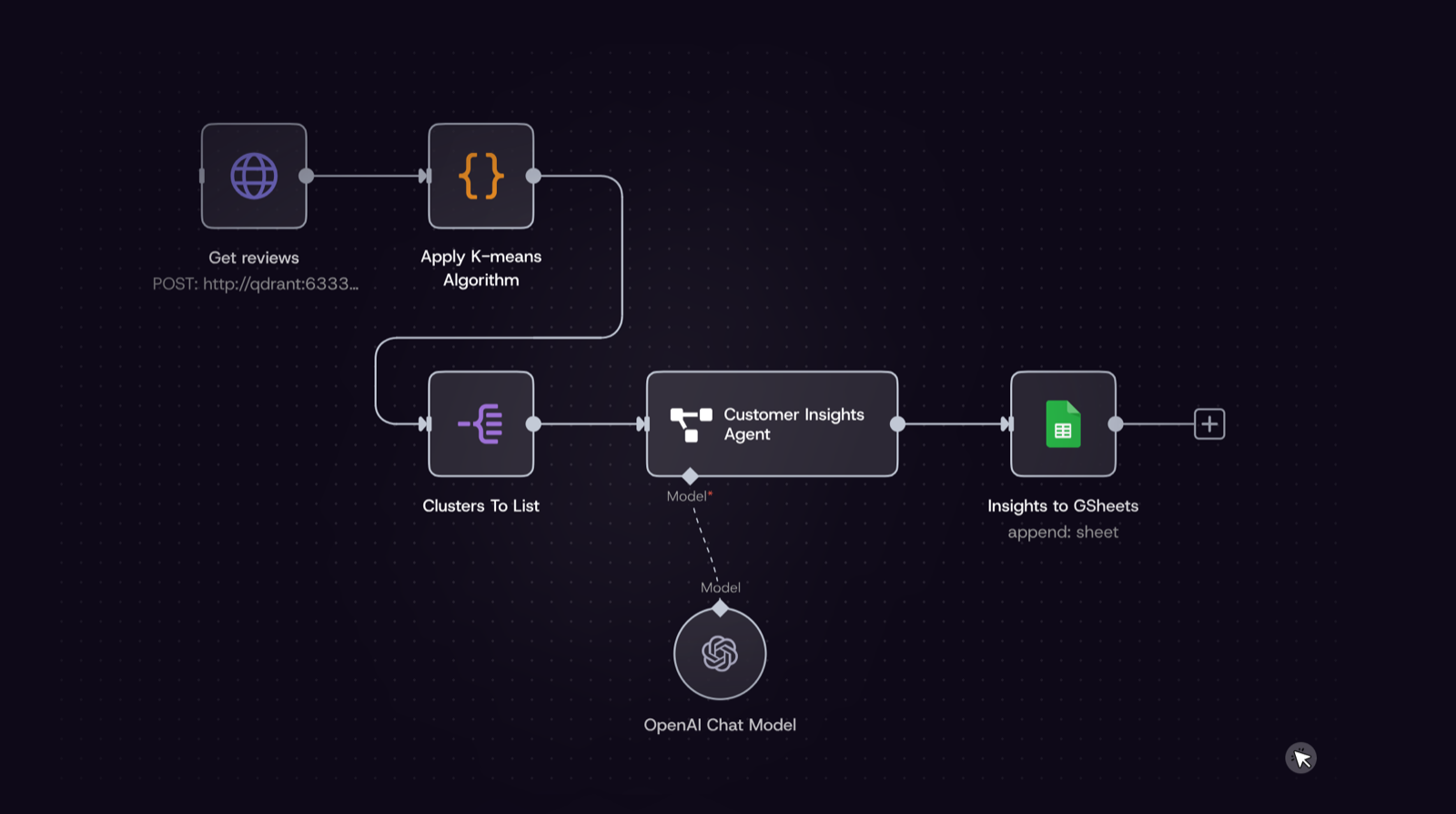
Most automation running in businesses today is flowchart-based. Zapier, Make and n8n all share the same model: you open a visual editor, pick a trigger (a form submitted, a payment failed, a call ended) and build the steps that follow, box by box, branch by branch. When the trigger fires, the tool walks through your boxes in order, the same way every time. It's dependable, it's cheap per run, and for simple repetitive jobs it has been the right answer for a decade.
Over the last few years these tools added AI. But it arrived in the same shape: another box. A step in the sequence can now be "ask a model something", and the sequence carries on with whatever comes back. Which is exactly where the difference this article is about begins.
The agent in a box
Flowchart tools do have agent features now, so it's worth being precise about what they are. In n8n, the AI Agent is a node: you place it in the workflow and attach its chat model, memory and tools in the editor. Their documentation describes it plainly: "Connect a chat model and one or more tools, and the agent decides which tools to call to complete a task."
Decides among which tools? The ones a person attached in the editor. Runs when? When the workflow reaches its box. And after it answers, the flowchart takes over again.
There is nothing wrong with this. It's deterministic automation with a clever step in the middle, and for a lot of jobs that's exactly right. The limit is structural rather than a quality problem: any branch nobody built can't happen.
When we started building Askpilot, I spent a month inside an award-winning UK estate agency, watching how the work actually happens. On paper, every job there is a clear sequence of steps: ask the tenant for documents, run the reference, get the contract signed. In practice, almost nothing went the way those steps describe. The tenant replies with a question instead of the document. The reference comes back incomplete. The landlord goes quiet for four days and then answers on WhatsApp instead of email. For the people, none of this was a problem; they dealt with each surprise without thinking twice. For the software, every surprise was a dead end, because nobody had built a branch for it, and nobody ever could. That gap, between how easily people absorb variation and how badly automations do, is the reason this article exists.
How agentic workflow automation actually works
In Askpilot it works like this. You install the Askpilot MCP in Claude, ChatGPT or any agent you already use, and describe the workflow you want in a normal conversation: chase unpaid invoices when a payment fails, qualify every new lead, collect documents for each new client. The agent sets the workflow up in Askpilot itself: it writes the PROCESS.md file, your instructions, rules and todos in one readable document, and picks the trigger that starts it. From then on Askpilot executes: it holds the connections to your tools, opens a case for each piece of work, and an agent works each case inside the rules.
Two concrete runs:
- Invoice chasing. A payment fails in Stripe and Askpilot opens a case for that invoice. The agent checks what's owed, sends a polite reminder, and waits. Nothing back after a few days? It follows up. The final notice pauses for your approval before it goes anywhere. When the money arrives, the case closes.
- Lead qualification. A new lead lands in the CRM and a case opens. The instructions say: reach the lead on the channels they use. The agent emails them, messages them on WhatsApp, then subscribes itself to replies on both channels, filtered to that one contact. Whichever channel the lead answers on, days later if that is what it takes, the same case wakes up, qualifies them against your rules, and books the call or closes the case.
Nobody built those branches in advance. The agent composed them because the instructions said what mattered.
What you end up with is two systems working together. Askpilot is the execution layer; it runs the workflow around the clock whether your chat is open or not. Claude stays the place you manage it: statuses and reports arrive back in the conversation, you ask what happened with any case, and changing the workflow means telling the agent what should be different. Try to build the same thing on a flowchart tool and the roles collapse. Connect Claude to n8n and the agent can build the graph, trigger it, even look up how past runs went if you ask. What it can't be is part of the run. Once the workflow starts, it walks its pre-built boxes without the agent: no judgment mid-run, nothing reports back on its own, and no case sits open waiting for a reply. In one model the agent is the operator of running work. In the other it's the builder's assistant.
Judgment does not mean the agent free-runs. In the instructions you can mark actions that always need a person's approval: sending a final payment reminder, for example. When the agent reaches one, it stops and shows you the exact message it wants to send. You can edit it before it goes, approve it as is, or stop it there. You are never approving a vague summary of what the agent wants to do. You see the exact words before they are sent. The format also supports explicit stop and escalate rules, because some situations should end a run or hand it to a person, and a workflow that can't say so isn't safe around customers.
That combination, a spec the agent follows plus approvals where it counts, is worth naming precisely because the word "agentic" is being stretched daily. RPA vendors (robotic process automation, the software bots that click through screens the way a person would) now rebadge orchestrated bots as agentic workflows. The test that cuts through it: who holds the pen? If the agent can only act inside boxes a human wired, it's automation with an agent step. If the agent directs the run under written rules, it's agentic execution. Anthropic's essay makes the same point from the safety side, and it's why "fully autonomous" is a red flag rather than a feature in this category.
Workflow automation, rebuilt for AI agents
Every generation of automation was shaped by the interface of its time. Scripts were automation for programmers. Flowchart editors arrived so people who don't write code could automate their tools, and for a decade that was the right trade. Agentic workflow automation is the next step in the same line: automation rebuilt for AI agents, where the interface is written language, because that is what agents read, write and follow.
The practical difference shows up in four places.
Exceptions stop being failures. In a flowchart, the first situation nobody predicted either errors out or gets silently forced down the wrong branch. With written rules, the agent handles the unexpected as it comes. When a tenant replies with a question instead of the document, the agent answers it and keeps the case moving. No branch for that situation had to exist in advance: the agent works it out on the spot, the way a person would.
Maintenance collapses into editing text. Changing a flowchart means opening the editor and rewiring boxes. Changing instructions means editing a sentence. And because the workflow is a readable document, the person who owns the process can open it and see exactly what it does, with no tool training required.
Nobody has to learn a builder. You describe the process in a conversation and the agent writes the PROCESS.md itself. The gap between the person who knows the process and the person who knows the tool disappears, because they're the same person again.
Work can wait. A case stays open for days and wakes up when something happens: the reply arrives, the payment lands, the document comes in. It closes when the work is done. A flowchart run starts, executes its steps, and is finished. Real business processes stretch over days and wait on other people.
That is why "rebuilt for AI agents" is a description rather than a slogan. Flowcharts were how humans specified steps for computers. Instructions are how you brief a capable colleague. Agents made the second one executable.
When the old way is still the right way
Honesty about boundaries beats category enthusiasm, so here is where flowcharts win.
If your workflow is "when a form is submitted, add a row to a sheet", close this tab and use Zapier. It has been the right answer for that job for a decade. A deterministic step runs in milliseconds and costs a fraction of a cent; an agent deciding takes seconds and costs real money. If a step is identical every time and runs thousands of times a day, a flowchart will always do it faster and cheaper. That might not change anytime soon.
n8n earns its place too: self-hosting, data pipelines, complex builds at serious volume. If your workflow is the same every time and you want to own the infrastructure, it's a fine tool.
Zapier keeps its own lane just as firmly: thousands of app connections, nothing to host, and the fastest way to wire two tools together. For simple straight-line automation between the software you already use, it stays the easiest choice.
And plenty of work needs no workflow at all. If the whole task finishes inside one Claude conversation, an execution layer would only add ceremony.
Agentic workflow automation earns its keep on the work that looks like a case file, not a pipeline: the invoice that needs chasing until it's paid, the document collection that spans two weeks and three follow-ups, the lead that answers on the wrong channel at the wrong hour. Workflows where cases vary, wait, and need judgment in the middle.
When agentic is the way to go
There is a simple test. Take any piece of work in your company and ask: does it finish the moment it starts, or does it depend on somebody coming back to you? If it finishes immediately, a flowchart can have it. If it depends on a reply, a document, a payment or a decision, it's a case, and cases are where agentic workflow automation changes what a small team can handle.
Think about what these have in common: the invoice you reminded once and meant to chase again. The lead who said "call me next month". The client who sent four of the five documents. None of this is hard work. All of it is open work, and open work is what quietly eats teams, because every open item lives in someone's head, and heads run out of room. The follow-up that would have won the deal doesn't fail because someone decided to skip it. It fails because it was Thursday and there were forty other open items.
Agentic workflows take over the remembering. Every open item becomes a case that waits, watches and acts: the third reminder goes out as reliably as the first, the case wakes the moment the reply or the payment arrives, and nothing depends on anyone's memory. You are involved at just two points: when you describe the workflow at the start, and when something needs your approval or judgment along the way. Everything in between happens whether you are busy or not.
Nobody buys this because AI is exciting. They buy it because the reminder still goes out on the Thursday when nobody had time to send it.
Why I wrote this
We started Askpilot because of what we learned during that month inside the estate agency. The work that kept the team late was never the hard work. It was the open work: the chasing, the waiting, the remembering. Flowchart tools could not hold it, because it never happens the same way twice. So people held it, and hiring more people to hold open work is what keeps small teams small.
Then agents arrived, and everyone started using the same words. The flowchart tools added AI nodes and called it agents. Under the shared vocabulary, two different things are being built. Flowchart automation replaces straightforward actions that need no reasoning, one step at a time. Agentic workflow automation goes after the whole job: an agent carries each case from start to finish, making the decisions along the way, the way a person handling it would.
That difference deserved a clear name, and the one that felt most fitting is agentic workflow automation. If "agentic" ends up meaning a flowchart with an AI node in it, the shift that actually changes how businesses run will have no word of its own. We built Askpilot for that shift. This article is my attempt to give it its proper name.
Frequently asked questions
Is n8n agentic workflow automation?
Not by the standard definition. n8n's AI Agent is a node inside a pre-built workflow: its chat model, memory and tools are wired up in the editor, and the flowchart decides when it runs and what happens after. That's deterministic automation with an agent as one of the steps. Agentic workflow automation flips the roles: the agent itself runs the workflow, following written instructions instead of a flowchart.
Why is agentic workflow automation better than flowchart automation?
It's better for work that varies, waits and needs judgment, not for everything. The concrete advantages: exceptions get handled instead of breaking the run, changing the workflow means editing a sentence instead of rewiring a graph, the workflow is written by the agent in conversation rather than built in an editor, and each case stays open until the work is finished. For identical high-volume sequences, flowchart tools remain faster and cheaper per step.
Is agentic workflow automation the same as an AI agent?
Related but not the same. An agent is the actor: a model that can decide and use tools. Agentic workflow automation is a whole business workflow run by an agent under written rules, with state that survives between events, and approvals where the rules require them. An agent in a chat can do a task right now, but nothing continues once you stop talking to it: it is not watching for Tuesday's reply, and it will not act tomorrow unless asked. A workflow is exactly what the chat lacks, something that keeps watching, remembering and acting after the conversation ends.
Is agentic workflow automation safe to use with customers?
Safe means bounded, not autonomous. The agent works inside written rules, actions you mark as sensitive always stop for approval, and you see exactly what the agent is about to do before it happens, whether that's a message, a payment or a record change. Explicit stop and escalate rules can end a run or hand it to a person. 'Fully autonomous' systems with none of these controls are the ones to be wary of.
Does agentic workflow automation replace Zapier?
No. If a workflow is a simple straight line (e.g. a form comes in, a row gets added), Zapier remains the fastest and cheapest way to run it, and that is unlikely to change anytime soon. Agentic workflow automation is for the other kind of work: where each case is a little different, where the work waits on replies or payments, and where judgment is needed along the way. That is the work that until now only a person could carry, because it needs someone who reasons about each case instead of repeating a sequence. Most businesses will end up using both.
What is PROCESS.md?
An open markdown format for describing a business workflow in plain language: instructions, rules and todos in one readable file. You describe your workflow to an agent like Claude or ChatGPT, the agent writes the PROCESS.md for you, and an execution layer like Askpilot runs it. The format is public at askpilot.com/process-md.html.
 +
+